the differences between 32650 and 32700 battery

What is the differences between 32650 and 32700 battery?

When buying batteries, it can be challenging to understand the differences between particular models. This article will discuss the difference between 32650 and 32700 batteryy, so you can decide what is best for your needs. We will go over the various characteristics of each battery, such as size, voltage, and energy capacity. This article also provides insight into which type of battery suits different applications.

the differences between 32650 and 32700 battery

The Size Differences between the 32650 and 32700 battery

The 32650 battery has a cylindrical shape, measuring 32mm in diameter and 67mm in length. On the other hand, the 32700 battery is an updated version of the LiFePO4 32650. Still, it is slightly larger, measuring 32.2 ± 0.3mm in diameter and 70.5 ± 0.3mm in length. In addition, the 32700 battery has a higher capacity than the 32650 battery, with a standard capacity of 6000mAh (at 0.2C discharge). As a result, the 32700 battery offers more power and energy density than the 32650 battery, making it smaller and lighter for the same-capacity battery.

The Voltage Difference

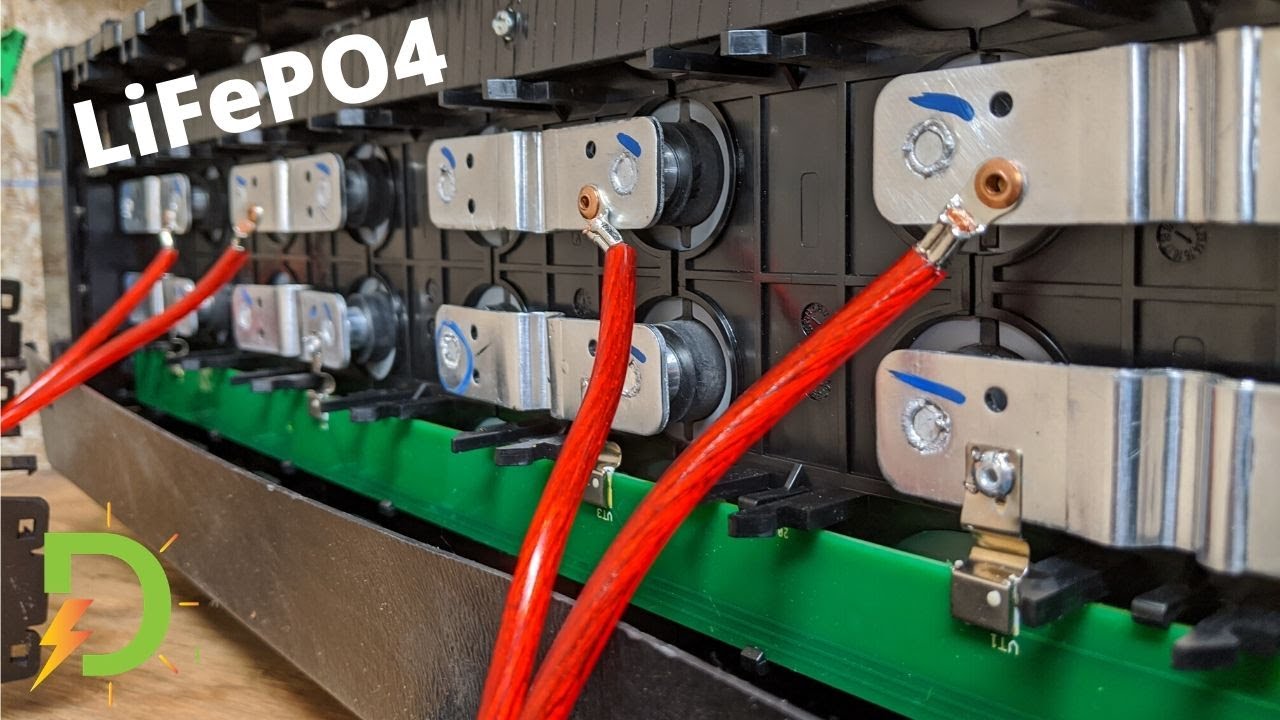
The 32650 and 32700 battery cells are both lithium iron phosphate cells with the same size, but the 32700 cell has a higher capacity than the 32650 cells. The nominal voltage of the 32650 battery is 3.2V. The 32700 battery has a nominal voltage of 3.7V, making it slightly higher than the 32650. The charge rate of both cells is 1C, and the standard capacity of the 32700 cells is 6Ah (at 0.2C discharge). The voltage of shipment for both cells is between 2.8V and 3.2V.

Capacity Differences

The 32650 and 32700 batteries have different capacities. The 32650 cells usually have an ability of 4,000 to 5,000 mAh, while the 32700 cells have a total of 6,000 mAh. The 32700 cells are the updated version of 32650 and can hold more energy than the 32650 cells. Furthermore, 32700 cells can also replace 32650 cells with the same size but higher capacity. ALL IN ONE’s batteries are based on LiFePO4 and can have a residual capacity of at least 80% of their rated power at 1C.

Applications for Each Battery

The 32650 and 32700 batteries are both rechargeable lithium-ion cells featuring LiFePO4 (Lithium Iron Phosphate) chemistry. The 32650 batteries are ideal for applications such as consumer electronics, electric bicycles and scooters, golf carts, home appliances, power tools, and solar energy storage systems, as they are small and lightweight. The 32700 batteries, on the other hand, are typically used in toys, power tools, home appliances, and consumer electronics due to their high capacity and stability with high temperatures. Furthermore, the 32700 batteries are more cost-effective than the 32650 batteries, making them the preferred choice for OEM/ODM applications.

Pros & Cons of Each Battery

The 32650 cells offer a higher energy density than the 32700 cells, meaning that the batteries will be smaller and lighter. This makes them ideal for applications where size and weight are important factors, such as solar projects or portable devices. The 32650 cells also have a longer cycle life, meaning they can be recharged and discharged multiple times without needing to be replaced. However, 32700 cells tend to have a higher maximum continuous discharge rate, making them a better choice for applications that require a high power draw. Additionally, 32700 cells offer excellent resistance to extreme temperatures, making them a better option for outdoor applications.

In conclusion

The 32650 and 32700 batteries are two types of lithium-ion batteries that differ in many ways. While the 32650 is commonly used for small devices such as flashlights, calculators, and digital cameras, the 32700 is used for larger devices like medical equipment and power tools. The 32650 also features a lower capacity than the 32700, but it offers more flexibility regarding the size. Both batteries are reliable and cost-effective choices for a variety of applications.

Lithium Ion vs. Lithium Polymer Batteries

Lithium Ion vs. Lithium Polymer Batteries: Which One Is Better?

With the growth of the battery-powered device market, understanding the differences between different types of batteries is becoming increasingly important. Lithium-ion (Li-ion) and lithium polymer (LiPo) batteries are two popular types of batteries used in many devices today. This article will explore the differences between Li-ion and LiPo batteries and discuss which is better for various applications.

Lithium Ion vs. Lithium Polymer Batteries

What is a Lithium Ion battery?

A lithium-ion battery is a rechargeable type with a high energy density and an excellent power-to-weight ratio. It is used in everyday items such as laptop computers, cell phones, digital cameras, and other consumer electronics. This type of battery has become increasingly popular due to its ability to hold a charge for extended periods than traditional batteries.

Lithium-ion batteries contain two electrodes: the anode, which stores lithium ions during charging, and the cathode, which releases them when discharging or using the stored energy. When it comes to charging, lithium ions are transferred from the anode to the cathode side through a separator between them and then back again when it’s time to discharge or use the stored energy.

What is Lithium Polymer Battery?

Lithium polymer batteries are a type of rechargeable battery technology that is becoming increasingly popular in consumer devices. The most common application is in mobile phones, laptops, and other small electronic items. Lithium polymer batteries offer several advantages over traditional lithium-ion (Li-Ion) batteries, including improved safety, lighter weight, and more flexible packaging options.

Lithium polymer cells are constructed with a thin, lightweight plastic pouch that contains the electrolyte material and provides additional structural strength to the cell. This construction makes them much safer than Li-Ion cells as their design prevents overheating or short-circuiting. Additionally, they can be designed into various shapes and sizes to fit even the tightest of space requirements.

Pros of Li-ion Batteries

One significant benefit is their high energy density and small size. Compared to other rechargeable battery technologies, Li-ion cells have higher power densities, meaning they can pack more energy into smaller packages. That makes Li-ion batteries perfect for mobile devices and other equipment that need long-lasting power sources without taking up too much space. 

Additionally, Li-ion batteries require fewer maintenance cycles than traditional lead acid or nickel-based models. They don’t need special charging requirements or regular topping off with electrolytes as some older battery technologies do.

Compared to Li-poly Batteries

One advantage of Li-ion over LiPo is cost. Typically, Li-ion batteries are cheaper than their LiPo counterparts because they don’t require additional protection circuitry and other components. In addition, due to their more straightforward construction, most Li-ion cells can be quickly charged using either gradual or rapid charging methods with no risk of damage from overcharging. That makes them ideal for high-throughput applications where many battery packs must be charged simultaneously.

Pros of Li-poly Batteries

Li-poly batteries can provide longer runtime than other types of rechargeable batteries, making them great for use in toys and remote control cars. They also supply more consistent voltage levels throughout the battery’s run time, giving the device a more uniform power output no matter how much you’ve used it. 

In addition to their efficiency and long runtimes, li-poly cells are also lightweight and small compared to other rechargeable battery alternatives. This makes them ideal for powering small electronic devices needing portability or larger applications with limited space. Furthermore, li-poly cells hold their charge very well when not in use – you can be sure that your device will still have plenty of power when you pick it up after some time.

Compared to Li-ion Batteries

First and foremost, Li-Poly batteries can store more energy in less space than their Lithium Ion counterparts. This makes them well suited for small-scale electronics such as cell phones or laptops, where size and weight may be a concern. Another advantage is that these batteries can provide higher discharge rates, enabling faster charging and more power when needed. 

In addition, Li-Poly batteries tend to have longer life cycles than traditional Lithium Ion cells meaning they can last longer with repeated charges and discharges over time without losing too much capacity.

Cons of Li-ion Batteries

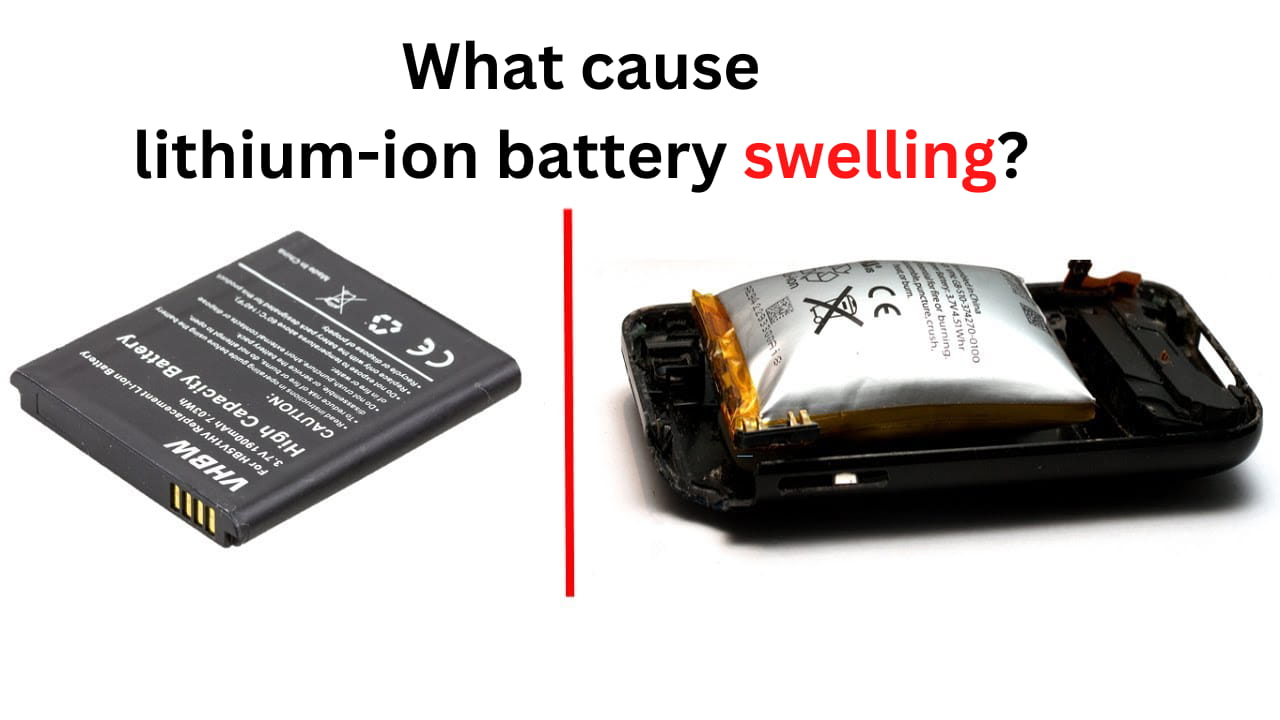
One con to using Li-ion batteries is that they contain a flammable electrolyte, which can cause a safety hazard when not properly handled or stored. They also require particular charging practices to prevent damage and ensure long battery life. If these procedures are not followed correctly, Li-ion batteries can become overcharged or short circuit, leading to fire hazards or other electrical issues.

Another downside of Li-ion batteries is that they have limited energy storage capacity and tend to degrade over time.

Cons of Li-poly Batteries

First, Li-poly batteries have a shorter lifespan than traditional alkaline or lead-acid batteries. Although they can usually be recharged hundreds of times without diminishing performance, prolonged use may eventually cause them to fail sooner than expected. Additionally, Li-poly batteries require unique charging methods. They often feature built-in safety mechanisms, making swapping out regular alkaline batteries for Li-poly ones difficult or impossible. 

The most significant disadvantage of Li-poly batteries is their cost. They are significantly more expensive than other types of rechargeable batteries on the market due to their high capacity and longevity, making them unaffordable for some users or applications. Moreover, they require special chargers to ensure a safe charge cycle which can also add extra cost to the equation.

In addition, Li-poly batteries require extra care during use and storage to ensure their safety and performance. They must be correctly discharged before recharging; otherwise, it could lead to overcharging or misbalance between cells which may damage the battery permanently.

Cost Comparison

Regarding cost, Li-ion batteries are generally more affordable than Li-poly batteries. Despite this, both types of batteries are still costly compared to other types. When looking at their power capacity, Li-ion batteries offer a higher density and more power than Li-poly batteries. With a lower self-discharge rate, Li-poly batteries can store energy for longer than Li-ion batteries. Ultimately, there is no real competition between the two batteries, and choosing the battery suited for a particular application is best.

Applications Comparison

Lithium-ion and lithium-polymer batteries are two of the most popular technology in consumer electronics today. Li-ion and Li-poly batteries offer several advantages over traditional battery types, such as higher energy density, lighter weight, and better safety. However, their applications vary due to their different structures and capabilities. Li-ion batteries are often used in devices that require high power output and long run times, such as laptops, power tools, and cell phones. Li-poly batteries are typically utilized in applications that need to be lightweight, such as drones and wearable devices. Both battery types have their unique advantages and are used in a variety of different products.

Conclusion: Which is Best?

The choice between Lithium Ion and Lithium Polymer batteries ultimately depends on the user’s needs. Both types of batteries offer their unique benefits, so it is essential to carefully consider your individual needs before making a decision. Lithium Polymer might be the way to go if you need an extremely lightweight battery. On the other hand, if you are looking for more capacity and power in a small package, then Lithium Ion could be the right choice.

How to Charge a 32650 Battery

How to Charge a 32650 Battery in 7 Steps?

Are you looking for a simple, easy-to-follow guide on how to charge your 32650 battery? Look no further! In this blog post, we’ll break down the process of charging your 32650 battery into 7 easy steps.

How to Charge a 32650 Battery

How to charge 32650 battery?

When charging a 32650 battery, finding the correct charger for the battery type is essential. Connect the positive and negative terminals of the battery to their corresponding ports and turn it on. Depending on the charger’s settings, it may take up to several hours to fully charge. A smart charger will automatically shut off once the battery is fully charged, but if using a basic charger, monitor the charging process and turn off the charger manually.

7 Steps to charge your 32650 battery

Step 1: Gather your materials.

To charge your 32650 battery, you’ll need a charger specifically designed for lithium-ion batteries. Ensure that the charger is rated for a voltage of 3.6V to 3.7V, the typical voltage range for a 32650 battery. You’ll also need the 32650 battery itself.

Step 2: Check the amperage of the charger.

The amperage rating measures how much electrical current the charger can provide. Using a charger with the correct amperage rating is essential to ensure you don’t overcharge your battery. If the amperage rating is not specified on the charger, check the manufacturer’s website or the user manual for your device.

Step 3: Connect the charger to a power source.

Plug the charger into an electrical outlet or a USB port on your computer. The LED light on the charger will typically turn on to indicate that it’s ready to charge your battery.

Step 4: Connect the battery to the charger.

Match the positive and negative ends of the battery to the corresponding terminals on the charger. The LED light on the charger will typically turn red to indicate that the battery is charging.

Step 5: Check the charging status.

Some chargers have an LED light that indicates the charging status. The light may turn green or off once the battery is fully charged. If your charger does not have an LED light, you can use a Voltmeter to check the charging status of your battery.

Step 6: Wait for the battery to charge fully.

How long it takes for your battery to charge will depend on the capacity of the battery, the amperage of the charger, and the charging conditions. Typically, a fully depleted 32650 battery can take anywhere from 4-8 hours to charge, but it can vary.

Step 7: Unplug the battery from the charger.

Once the battery is fully charged, it’s important to unplug it from the charger to prevent overcharging. It’s also a good idea to keep the battery in a cool, dry place to maximize its lifespan when it’s not in use.

The charging current for a 32650 battery will depend on the manufacturer’s specifications and the charging method used. A maximum current of 1C should be charged at 3,000 mAh. Charging at a higher current than recommended can damage the battery and reduce lifespan.

What is the charging voltage of LiFePO4 32650?

The charging voltage of a LiFePO4 32650 is typically 3.2-3.6V. Using a charger specifically designed for LiFePO4 batteries is essential, as the wrong charger can cause damage or even fire. When charging, you should monitor the battery closely and ensure it does not exceed 4.2V, which could cause irreversible damage to the cell.

In conclusion

And that’s it! With these seven simple steps, you can charge your 32650 battery safely and effectively. Always check the manufacturer’s website or the user manual for your device for specific instructions and charging guidelines.

32650 batteries charger

What is 32650 lifepo4 battery charging voltage?

Suppose you’re using a 32650 lithium iron phosphate (LiFePO4) battery. In that case, it’s important to charge it at the correct voltage to ensure the longevity and safety of the battery. So, what is the charging voltage for a 32650 LiFePO4 battery?

32650 batteries charger

What is 32650 lifepo4 battery charging voltage?

The charging voltage for a 32650 LiFePO4 battery is typically between 3.6 and 3.8 volts per cell. That means that the charging voltage for a 12-volt 32650 LiFePO4 battery should be between 21.6 and 22.4 volts. It’s important to note that the charging voltage may vary slightly depending on the specific 32650 LiFePO4 battery you are using. So it’s always a good idea to check the manufacturer’s recommendations for the optimal charging voltage.

Consider the charger of LiFePO4 batteries.

It’s also essential to use a charger specifically designed for LiFePO4 batteries. These chargers are usually labeled as “LiFePO4” or “LFP” chargers. They are designed to provide the correct voltage and charging profile for LiFePO4 batteries. Using a charger that is not intended for LiFePO4 batteries can result in overcharging or undercharging, which can lead to shortened battery life and potentially even cause damage to the battery.

Can I charge a 32650 LiFePO4 battery with a regular charger?

Yes, you can charge a 32650 LiFePO4 battery with a regular lead-acid charger as long as it is set to no higher than 14.6v for regular charging. It is important to note that this should be disconnected after the battery is fully charged to ensure the cell’s longevity and avoid damage. LiFePO4 chargers from all major and reputable brands will limit the charge voltage to 14.6V, so it is essential to ensure that your charger meets this requirement before attempting to charge your battery.

In summary

The charging voltage for a 32650 LiFePO4 battery is typically between 3.6 and 3.8 volts per cell. It’s essential to use a charger specifically designed for LiFePO4 batteries and refer to the manufacturer’s recommendations for the specific charging voltage of your 32650 LiFePO4 battery.

32650 lifepo4 battery

What are the Benefits of the 32650 lifepo4 battery?

32650 lifepo4 batteries are popular for various applications, including renewable energy systems, electric vehicles, and consumer electronics. These batteries offer several key benefits, making them an attractive choice for many users.

32650 lifepo4 battery

The first benefit is high energy density.

One of the most beneficial characteristics of 32650 lifepo4 batteries is their high energy density. This makes them ideal for various applications, from consumer electronics and automotive to renewable energy storage. These batteries have excellent performance in terms of convenience, safety, and reliability. 

These batteries offer several advantages over other rechargeable batteries due to their high energy density. They can provide more power for extended periods than any other type, making them suitable for applications requiring a large amount of energy with limited space or weight restrictions. Additionally, they can be recharged many times without any significant loss in performance as opposed to Nickel-Cadmium (NiCd) or Lead Acid (PbA) cells which tend to lose capacity over time when used frequently.

The second benefit of the 32650 lifepo4 battery is its long lifespan.

The second particularly appealing benefit of LiFePO4 32650 batteries is their long lifespan. With proper care and usage, these high-performance cells can last up to 10 times longer than traditional lead acid or NiMH chemistries. This makes them an ideal choice for applications where frequent battery replacements would be costly or inconvenient. The exceptional lifetime performance also means fewer replacement trips to the store and less environmental waste from spent cells.

The third benefit of the 32650 lifepo4 battery is durability.

In addition to their long lifespan, these batteries are also incredibly durable. With high resistance to extreme temperatures and weather conditions, 32650 lifepo4 batteries remain reliable for extended periods. This makes them an ideal choice for those who need dependable power that can withstand various environmental pressures. 

The lightweight design of 32650 lifepo4 batteries offers another excellent benefit over traditional lead-acid models. They’re easier to transport and store, making them more user-friendly than standard battery types. Not only are they durable and lightweight, but the low self-discharge rate ensures that they retain power even when not in use – further contributing to their overall convenience and longevity.

The final benefit is environmentally friendly.

Finally, 32650 lifepo4 batteries are also environmentally friendly. They do not contain toxic materials such as lead or cadmium, making them safer and more accessible to dispose of than other battery types. Additionally, there is much less energy consumed during the production process than traditional batteries because these cells can be recharged multiple times with minimal performance degradation over time. This means less energy is needed for production purposes, and fewer resources must be used overall.

In conclusion

All in all, the benefits of 32650 lifepo4 batteries make them a healthy choice for a wide range of applications. Their high energy density, long lifespan, durability, and environmental friendliness make them popular for consumer and industrial applications. 32650 lifepo4 batteries will be a good choice if you are looking for a cost-effective battery.

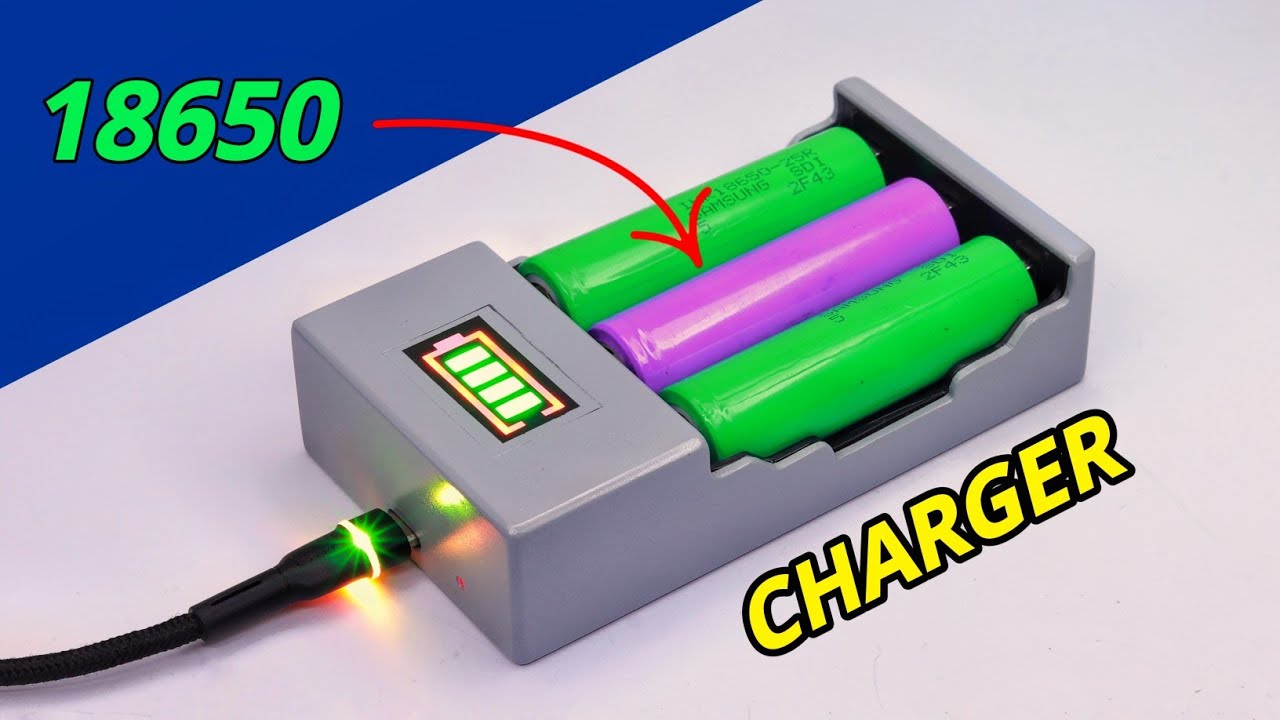
32650 lifepo4 vs 18650

32650 lifepo4 vs 18650, what are the differences?

Are you in the market for a new battery for your electronic device? If so, you may wonder about the differences between 32650 lifepo4 and 18650 batteries. Understanding the critical differences between these two types of batteries can help you decide which suits your needs.

32650 lifepo4 vs 18650

The introduction of 32650 lifepo4 and 18650

First, let’s start by explaining what these types of batteries are. A 32650 lifepo4 battery is a lithium iron phosphate battery that is cylindrical in shape and measures 3.26 inches in diameter and 5 inches in length. It has a relatively large capacity and is commonly used in solar panels, electric bikes, and other applications where a high-capacity battery is needed.

On the other hand, a 18650 battery is also a lithium-ion battery. Still, it is smaller, measuring 1.86 inches in diameter and 6.5 inches in length. It is commonly used in electronic devices such as laptops, cell phones, and power banks.

The capacity difference between 32650 lifepo4 and 18650

One of the key differences between these two types of batteries is their capacity. The 32650 lifepo4 battery has a much higher degree than the 18650 battery, which means it can store more energy and therefore has a longer lifespan. This makes the 32650 lifepo4 battery a good choice for applications with a long-lasting batteries, such as solar panels or electric bikes.

The discharge rate difference between 32650 lifepo4 and 18650

Another difference between these two types of batteries is their discharge rate. The 32650 lifepo4 battery has a slower discharge rate than the 18650 battery, which means it can maintain a stable voltage for extended periods. This makes it a good choice for applications where a steady voltage is essential, such as in solar panels.

The cost difference between 32650 lifepo4 and 18650

In terms of cost, the 18650 battery is typically cheaper than the 32650 lifepo4 battery. This is because it is smaller and easier to manufacture so that it can be produced at a lower cost. However, remember that the higher capacity and longer lifespan of the 32650 lifepo4 battery may make it a more cost-effective choice in the long run.

In conclusion

The main differences between 32650 lifepo4 and 18650 batteries are their size, capacity, discharge rate, and cost. The 32650 lifepo4 battery is more extensive, has higher power and a slower discharge rate, and is generally more expensive than the 18650 battery. However, it may be a more cost-effective choice in the long run due to its longer lifespan. Consider these factors when deciding which type of battery is right for your needs.

32650 lifepo4 battery manufacturer

How to choose a 32650 lifepo4 battery manufacturer in 6 steps?

Choosing a manufacturer for your 32650 lifepo4 battery can be daunting. Still, with little research and due diligence, you can find a reliable and trustworthy supplier for your needs. Here are some tips on how to choose a 32650 lifepo4 battery manufacturer.

32650 lifepo4 battery manufacturer

Consider the quality of the products.

When looking for a battery supplier, it is essential to find a manufacturer with a proven track record of producing high-quality batteries that meet industry standards.

You can request samples or read customer reviews to better understand the manufacturer’s reputation. These extra steps can help you find a reliable source for your battery needs.

Look for a manufacturer with a good supply chain.

Finding a manufacturer with a good supply chain is critical for ensuring consistent and timely deliveries of your batteries. Good communication with your suppliers throughout the production process helps to ensure that expectations are met and that any issues can be quickly resolved. 

Look for a supplier with a good track record who offers excellent customer service and can provide you with advance schedules and live video updates on the progress of your order.

Consider the manufacturer’s customer service.

Good customer service from a battery manufacturer is essential for the success of your business. An effective customer service team should be available to answer your questions and provide support and advice on any issues you may have with their products. A reliable battery supplier should understand that their customers need to know they can trust them and that they can resolve all issues quickly.

The proper battery manufacturer will go above and beyond to ensure the satisfaction of their customers. They should be available when needed, respond promptly, remain professional, explain things clearly and accurately, and take responsibility if something goes wrong. With an efficient customer service system, manufacturers can ensure their customers are happy with their products and services, leading to long-term loyalty.

Compare prices.

It is no secret that batteries cost has been rising in recent years. Finding an affordable battery manufacturer can be daunting, but ensuring you get quality products at reasonable prices is essential. 

While purchasing batteries from manufacturers with meager prices may be tempting, proceed cautiously. Batteries are essential components to many devices and appliances and must be reliable and durable. Lower prices may indicate lower quality materials or manufacturing techniques, leading to decreased performance or shorter lifespan. 

Buyers should always research before choosing a battery manufacturer, looking into reviews of past customers as well as certifications and overall quality assurance processes they have in place. Doing this will ensure your battery purchases are both reasonably priced and reliable for long-term use.

Check for certifications and accreditations.

When searching for a battery manufacturer, they must know about certifications they have received from reputable organizations. Organizations such as UL and CE are industry recognized and accept only the highest-quality products. A battery manufacturer that has been certified by either of these organizations is an indication of a reliable provider.

Certifications from UL or CE demonstrate the product’s safety, performance, and quality standards, meaning you can be sure that the batteries you purchase are safe and reliable. Furthermore, certification also shows that the company has met all legal requirements regarding production safety standards. With this in mind, seeking a supplier with UL or CE certification is worthwhile, as this will help ensure your products meet high industry standards.

Consider the manufacturer’s experience.

Any business owner purchasing batteries for their operation should consider the experience of the battery manufacturer. The battery industry is constantly changing and evolving, and the knowledge base of a long-standing battery manufacturer can prove invaluable. It’s essential to find a reliable source for your battery needs that can offer quality products at an affordable price.

A battery manufacturer with a long history in the industry will have more expertise and resources than one that has recently entered the market. They’ll be able to provide higher quality products and better customer service, technical support, warranties, and after-sales services. 

Additionally, these manufacturers often have an extensive network of dealers who can provide easier access to parts and accessories and advice on properly using and maintaining your batteries. This assistance can save you time and money when deciding what type or size of the battery is right for your needs.

In conclusion

Considering these factors, you can narrow down your options and find a 32650 lifepo4 battery manufacturer that meets your needs and budget. Be bold and ask questions, and do your research to ensure you’re getting the best possible product for your needs.

LiFePO4 vs lithium ion battery

Which is better LiFePO4 vs lithium ion battery?

When it comes to choosing the correct battery for your needs, there are a lot of considerations to make. LiFePO4 and lithium-ion batteries are popular choices, but which is the better option? This article will compare these two battery types in terms of their performance, environmental impact, and cost to help you make an informed decision when choosing between LiFePO4 vs lithium-ion batteries.

LiFePO4 vs lithium ion battery

Background on lithium-ion batteries

History and development of lithium-ion batteries

The history and development of lithium-ion batteries began in the 1970s with actual work by scientists on the technology. In 1985, Akira Yoshino developed a prototype of the modern Li-ion battery, which used a carbonaceous anode instead of lithium metal. This was commercialized by a Sony and Asahi Kasei team led by Yoshio. 

In the late 1970s, a team of global scientists started developing the lithium-ion battery, which was later used in consumer products such as mobile phones and laptops in 1996. Goodenough, Akshaya Padhi, and coworkers proposed lithium iron in the 1990s. 

In 1991, Sony commercialized secondary Lithium-ion batteries for rapid growth in sales and benefits compared to rechargeable battery systems. Alessandro Volta invented the first actual battery in 1800, made of copper (Cu) and zinc discs stacked together. Since then, there has been remarkable progress made with lithium-ion batteries.

How lithium-ion batteries work

Lithium-ion batteries transfer lithium ions and electrons from the anode to the cathode. The movement of the lithium ions creates free electrons in the anode, which creates a charge at the positive current collector. This electrical current flows from the current collector through a powered device (cell phone, computer, etc.) to the negative current collector. 

At the anode, neutral lithium is oxidized and gives up its single electron as it travels toward the cathode. Meanwhile, at the cathode, oxygen molecules accept these electrons and combine them with lithium ions to form molecules of lithium peroxide. This process is reversed when the battery recharges: oxygen molecules break apart and release electrons and lithium ions, which travel back to the anode. This cycle of charging and discharging allows lithium-ion batteries to provide a steady power source.

Advantages of lithium-ion batteries

Lithium-ion batteries offer a variety of advantages over other types of rechargeable batteries. One of the main benefits of these batteries is their high energy density, which is one of the highest in the rechargeable-battery market at 100-265 Wh/kg. This allows for a longer charge time and higher power-to-weight ratio than other types of batteries. 

Additionally, these batteries have a long shelf life, estimated at 5-7 years at 68°F/20°C. They also have high energy efficiency and low self-discharge rate. Furthermore, lithium batteries have a higher depth of discharge than other battery types. All these characteristics make lithium-ion batteries an attractive choice for many applications.

Background on LiFePO4 batteries

History and development of LiFePO4 batteries

The history and development of LiFePO4 batteries date back to the 1970s when fundamental works on lithium-ion batteries began. Since then, remarkable progress has been made in developing LiFePO4 batteries. 

Whittingham proposed using lithium in batteries in 1976 while he was an engineer at an American oil company. In 1996, John B. Goodenough’s research group at the University of Texas published their research on LiFePO4 as a cathode material. 

Subsequently, the technology has been further developed and improved, leading to fast charging, more considerable autonomy, lighter batteries, and lower cost. Moreover, polymer electrolytes have allowed for greater design freedom and higher energy density. Today, LiFePO4 batteries are used in various applications due to their low cost and long lifetime.

How LiFePO4 batteries work

Lithium iron phosphate (LiFePO4) batteries are lithium-ion (Li-Ion) rechargeable batteries. LiFePO4 batteries use lithium iron phosphate as the cathode material, along with a graphite carbon electrode and a metallic current collector. When charging the battery, a charger passes current to the battery, and lithium ions move in or out of the LiFePO4 material. This process releases electricity when discharging the battery. 

The benefits of LiFePO4 batteries over other lithium-ion batteries include their ability to operate in a wide temperature range, making them suitable for various applications.

Advantages of LiFePO4 batteries

LiFePO4 batteries boast many advantages over other lithium batteries and lead acid batteries. They have a longer lifespan, with a 350-day storage capacity, and can last up to four times longer than lead acid batteries. 

In addition, LiFePO4 batteries offer a high discharge capacity of nearly 100% versus 80% for lead-acid batteries, meaning fewer charge cycles are needed. Recent independent degradation tests have also proven that LiFePO4 chemistry is safer and has a longer lifespan than other lithium batteries. All these benefits make LiFePO4 batteries an ideal choice for portable and stationary applications.

Comparison of lithium-ion and LiFePO4 batteries

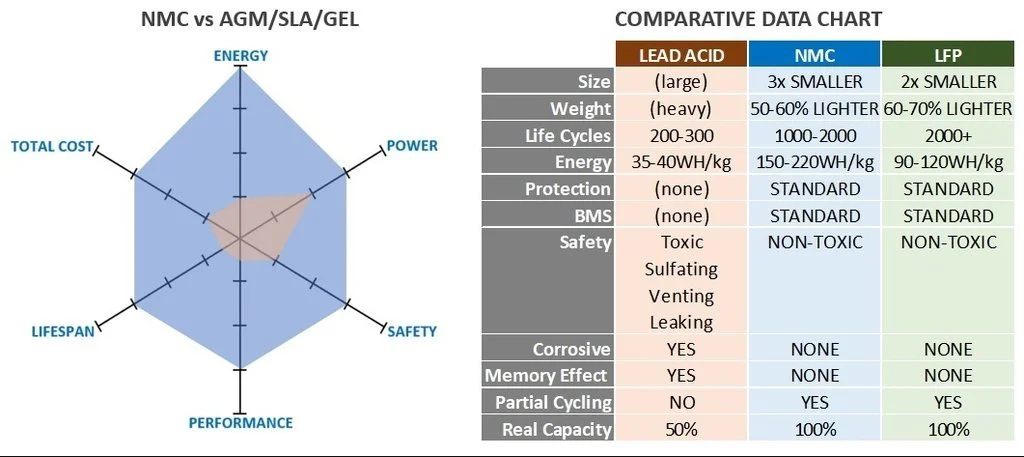
Comparing lithium-ion (Li-ion) and LiFePO4 batteries is essential to determine the best option for various applications. Li-ion batteries are more energy dense than LiFePO4 batteries, with an energy density ranging from 160-265 Wh/kg, whereas LiFePO4 batteries have an energy density of around 100-170 Wh/kg. 

LiFePO4 batteries have a longer lifespan than Li-ion batteries, with a life expectancy of 5-7 years compared to the 3-5 years of Li-ion batteries. Also, LiFePO4 batteries are generally considered safer than Li-ion batteries due to their lower operating voltages and better safety profile. Cost is also a factor to consider when comparing the two types of battery, as lithium-ion batteries tend to be more expensive than LiFePO4 batteries. 

Finally, the life cycle climate and cost impacts of both batteries should also be considered when comparing. Lithium-ion batteries tend to have a more significant environmental impact than LiFePO4 batteries.

Applications of lithium-ion and LiFePO4 batteries

Lithium-ion batteries are widely used in various electronic devices, from smartphones and laptops to energy storage systems. These rechargeable batteries offer a high energy density, long cycle life, and low self-discharge rate, making them ideal for powering portable devices. Lithium-ion batteries also have the potential for large-scale applications such as grid-level energy storage systems. 

LiFePO4 batteries are also becoming increasingly popular due to their lower cost and cobalt-free construction. They are often used in boats, solar systems, and vehicles such as plug-in hybrids and all-electric cars. LiFePO4 batteries also have advantages over lithium-ion batteries, such as higher thermal stability and longer life cycle. Both batteries should not be disposed of in domestic garbage or recycling bins and require special recycling facilities for proper disposal.

Conclusion

After reviewing the key points of comparison between lithium-ion and LiFePO4 batteries, it is clear that the two technologies have distinct advantages and disadvantages. Lithium-ion cells are more energy-dense, have a higher power output, and are more cost-effective than LiFePO4 batteries. However, LiFePO4 cells have a longer lifespan and are safer than lithium-ion batteries. Depending on the application, either technology may be more suitable. For example, you need a high power output and don’t mind replacing the battery every few years. Lithium-ion batteries could be the better choice. However, if safety is paramount or you require a longer battery life, LiFePO4 cells may be the better option.

8-Packaging-Processes-For-Lithium-Polymer-Batteries

8 Packaging Processes For Lithium Polymer Batteries

Lithium battery soft packs have good safety performance, so they are widely used in electronic digital products, medical equipment, medical equipment, and handheld electronic equipment. I believe that many people do not understand the packaging process of lithium battery soft packs. Technology will share with you the packaging process of lithium battery soft pack through this article.
1. Soft pack battery.
The soft-wrapped cells that everyone has encountered are all cells that use aluminum-plastic film as the packaging material. Different packaging materials determine the use of different packaging methods. Welding is used for packaging batteries.
2. The outer layer of outer packaging, aluminum plastic film.
The aluminum-plastic composite film can be roughly divided into three layers – the inner layer is the bonding layer, and polyethylene or polypropylene materials are mostly used to play the role of sealing and bonding; the middle layer is aluminum foil, which can avoid the infiltration of water vapor from the outside of the battery. At the same time, the leakage of the internal electrolyte is avoided; the outer layer is a protective layer, and high-melting polyester or nylon materials are mostly used, which have strong mechanical properties, avoid damage to the battery by external forces, and protect the battery.
3. Aluminum-plastic film stamping forming process.
The soft-packed cells can be designed into different sizes according to the needs of customers. After the external dimensions are designed, the corresponding molds need to be opened to stamp and form the aluminum-plastic film. The forming process is also called punching, which is to use a forming die to punch out a core-rolling hole on the aluminum-plastic film.
4. Packaging side sealing, top sealing process.
The packaging process includes two processes of top sealing and side sealing. The first step is to put the wound core into the punched pit, and then fold the unpunched side along the punched pit side.
5. Liquid injection and pre-sealing process.
After the soft-packed cells are sealed on the top side, x-ray must be done to check the parallelism of the core, and then enter the drying room to remove moisture. After standing in the drying room for a few times, it enters the liquid injection and pre-sealing process.
6. Standing, forming, fixture shaping.
After the liquid injection and sealing are completed, the cells need to be left to stand. According to the difference in the production process, it is divided into high temperature static and normal temperature static. The effect of standing is to allow the injected electrolyte to fully infiltrate the machine. , which can then be used to make
7. Two sealing process.
During the second seal, the first step is to puncture the air bag with a guillotine knife, and at the same time, vacuumize, so that the gas and a part of the electrolyte in the air bag will be drawn out. Then immediately carry out the second seal to ensure the airtightness of the cell. Finally, the air bag is cut off, and a soft-packed cell is almost formed.
8. Post-processing.
After the two air bags are cut, it is necessary to trim and fold the edges to ensure that the width of the cells does not exceed the standard. The folded cells will enter the capacity distribution cabinet for capacity separation, which is actually a capacity test.

Lithium Batteries May One Day Replace Conventional Submarine Diesel Engines

Lithium Batteries May One Day Replace Conventional Submarine Diesel Engines

With the advancement of lithium technology, it is possible that lithium batteries may one day replace conventional submarines’ diesel engines. The Japanese Navy has already implemented the use of LIBs in its Soryu-class attack subs. South Korea is also testing the technology for their next-generation attack subs. Other applications for LIBs include the US Special Forces delivery vehicle, as well as the Russian Surrogat unmanned mini-sub.

However, the technology has its drawbacks. Lithium is flammable and can catch fire when exposed to water. Leaks in lithium can reach temperatures of 3,600 degrees Fahrenheit. Furthermore, a fire in a lithium battery releases hydrogen gas, which is highly flammable. While the benefits of using lithium batteries for submarines are numerous, there are still significant concerns about the safety of this technology.

While there are a number of downsides to lithium-ion batteries, the technology has proven to be reliable. Japan, for example, plans to build one more Soryu-class submarine with LIBs. The development of a LIB-submarine would also allow Japan to upgrade its older Stirling AIP powered Soryus. So, while LIBs present certain risks, they are expected to make an impact in the future of submarine propulsion.

While LIBs have some risks, these batteries have been proven to be safer than lead-acid batteries. The research and development of light-metal batteries will benefit from this data. The US Navy has already chosen lithium-ion main batteries for its KSS-III batch 2 submarines. In addition, South Korea has chosen to use lithium-ion batteries in its nuclear-powered Soryu-class boats. The seventh Soryu-class boat is also expected to incorporate a combination of Stirling Engines and lithium-ion batteries. These vessels will serve as a bridge between lead-acid and lithium-ion technologies.

The development of LIB batteries is a challenge for the lead-acid-powered submarines. They can’t be fully replaced by lead-acid batteries and will remain a major asset for the military for years to come. But the advancements in the technology have opened up new doors for submarines. The resulting improved performance means they can cruise for longer periods of time under the water.

Despite the risks of Lithium-ion batteries, they are the most reliable option for submarines. Although the lithium-ion batteries are safer than lead-acid batteries, they do have some drawbacks. In addition to high cost, they have high maintenance and are not completely safe to use in the ocean. Moreover, they are expensive to operate, requiring extensive maintenance.

The benefits of LIBs are considerable. In addition to their high-speed capability, they are also incredibly safe and durable. If the marine environment is a threat to the life of a submarine, it is essential to ensure that it is safe to use and a reliable and long-lasting power supply. Ultimately, LIBs will save lives. But for now, these batteries are not without risks.

Because of the huge benefits of lithium-ion batteries for underwater vehicles, they have many other advantages. Compared to conventional submarines, they have a lower cost than lead-acid submarines. They can also be operated for longer periods of time. This makes lithium-ion-powered subs an attractive option for many companies and governments. This technology can be used in other fields as well, including for commercial purposes.

The use of lithium batteries for conventional submarines could dramatically reduce their costs. The cost of lithium-ion batteries could be cheaper than traditional lead-acid batteries, and the technology may be more efficient than lead-acid. Additionally, the high-energy density of lithium-ion-based batteries will provide longer service life. They are also more reliable than lead-acid batteries.

The development of lithium-ion batteries for submarines is an exciting development. The advanced batteries will give the submarines better endurance under water, which is crucial for a modern submarine. These batteries may also be the main power supply for conventional submarines. They are not only cheaper than lead-acid batteries, but they are lighter, more efficient and more environmentally friendly. In the future, these submarines may use this technology to be able to operate at greater depths than ever before.